Professional Work at Style Studios
At Style Studios, I contributed to the development of creative and technically advanced multiplayer virtual reality games, focusing on maintaining a balance between innovation and stability.
Role & Responsibilities
- Oversaw the integration of new features into existing game architecture.
- Mentored junior developers, providing hands-on learning and constructive feedback.
- Developed and maintained core game features ensuring high performance and responsiveness.
- Implemented networking solutions using Unity Netcode for GameObjects for seamless multiplayer.
- Enhanced performance through Unity ECS design, optimizing gameplay on Quest 2.
- Designed scalable inventory and item systems for diverse in-game assets.
- Created in-game tools for designers, streamlining scriptable object editing.
Key Technologies
Project Highlights
My work significantly contributed to the studio's first multiplayer VR title, ensuring robust networking, high performance on target platforms like Quest 2, and efficient content pipelines for designers. I focused on creating modular and maintainable codebases to facilitate rapid iteration and feature expansion.
Visuals & Code Snippets
A brief video of The player inventory in action.
Code Snippet: Adding Items to Player Inventories
        /// Attempts to add a specified count of a single item type to the inventory.
        /// Prefers adding to an existing non-full stack. If no existing stack can take it,
        /// attempts to create a new stack. Rejects items that cannot be placed.

        /// param name="incomingEntry" An ItemEntry representing the items to add, including count and m_itemId.
        /// param name="rejectionCount" Outputs the number of items that could not be added.
        public void AddItem(ItemEntry incomingEntry, out int rejectionCount)
        {
            rejectionCount = 0;
            //null check for sanity
            if (incomingEntry == null || incomingEntry.ItemID == null || incomingEntry.StackCount <= 0)
                return;
            //stash local variables
            int itemsRemainingToAdd = incomingEntry.StackCount;
            var targetRef = incomingEntry.ItemID;
            //find the stack if it exists
            ItemEntry existingStack = null;
            foreach (var itemInInventory in ItemInventory)
            {
                if (itemInInventory.ItemID == incomingEntry.ItemID)
                {
                    existingStack = itemInInventory;
                    break; // Found the stack, since there should only be one.
                }
            }
            //if the stack exists and isnt full yet, we populate
            if (existingStack != null)
            {
                //logic for populating an existing stack
                rejectionCount = AddItemsToStackIfPossible(itemsRemainingToAdd,ref existingStack);
            }
            else
            {
                //stack doesnt exist, so we make it
                ItemEntry newEntry = new(incomingEntry.ItemID, m_maxStackSize, false);
                rejectionCount = AddItemsToStackIfPossible(itemsRemainingToAdd,ref newEntry);
                ItemInventory.Add(newEntry);
            }
        }
Example of how I designed adding items to player or server inventories.
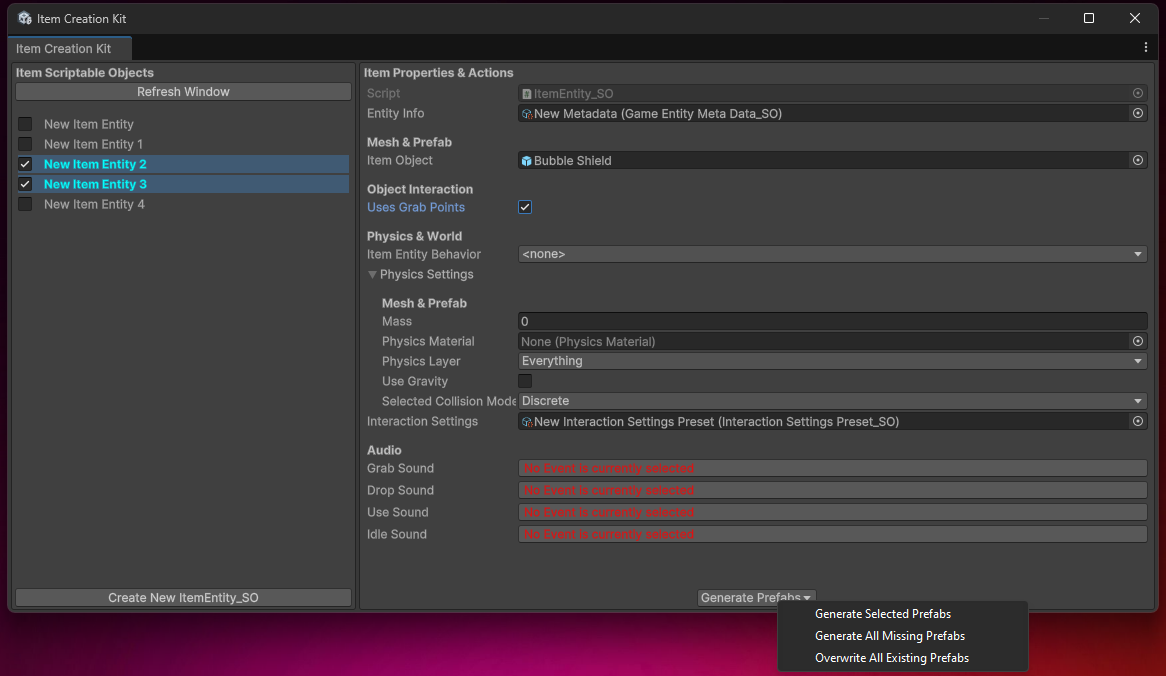
Custom Window designed to fastrack bulk creation and organisation of items. This tool generates the prefabs, saves them in a folder, and loads them into our item singleton and network prefab list.
Code Snippet: Item Creation Toolkit Prefab generation
    /// Generates or updates a prefab for a given ItemEntity_SO.

    /// param name="itemSO">The ItemEntity_SO to generate a prefab for.
    /// param name="forceOverwrite">If true, overwrites an existing prefab without prompting.
    private void GeneratePrefabForSO(ItemEntity_SO itemSO, bool forceOverwrite)
    {
        if (itemSO.MetaData == null || string.IsNullOrEmpty(itemSO.MetaData.Name))
        {
            Debug.LogError($"Cannot generate prefab for '{itemSO.name}'. MetaData or MetaData.Name is missing.");
            return;
        }
        string prefabName = itemSO.MetaData.Name;
        string prefabPath = GetPrefabPath(itemSO);
        // Ensure the directory exists
        string directory = Path.GetDirectoryName(prefabPath);
        if (!Directory.Exists(directory))
        {
            Debug.LogError("The prefab path directory does not exist.");
            return;
        }
        GameObject existingPrefab = AssetDatabase.LoadAssetAtPath< GameObject>(prefabPath);
        if (existingPrefab != null && !forceOverwrite)
        {
            // This case should ideally be handled by the calling method's logic (e.g., GenerateSelectedPrefabs)
            // but included for robustness if this method is called directly.
            Debug.Log($"Skipping prefab generation for '{prefabName}' as it already exists and forceOverwrite is false.");
            return;
        }
        // Create the base GameObject using your static method
        GameObject baseObject = ItemCreation.CreateBaseItemEntity(itemSO);
        // Save it as a prefab
        GameObject newPrefab = PrefabUtility.SaveAsPrefabAssetAndConnect(baseObject, prefabPath, InteractionMode.UserAction);
        // Clean up the temporary GameObject created in the scene
        DestroyImmediate(baseObject);
        if (newPrefab != null)
        {
            Debug.Log($"Successfully generated/updated prefab for '{prefabName}' at: {prefabPath}");
            // Mark the ItemEntity_SO as dirty so Unity saves changes if any were made during creation
            EditorUtility.SetDirty(itemSO);
        }
        else
        {
            Debug.LogError($"Failed to generate prefab for '{prefabName}'.");
        }
        AssetDatabase.SaveAssets();
        AssetDatabase.Refresh();
    }
Illustrates how the prefab instance is generated within the toolkit saved and stored within the item system I devised.